
Illumi Agent
How we combined web search and an AI chat agent in one field
Do you prefer traditional web search or help from an AI agent when looking for something on a website? It probably depends on what you’re looking for.


Sometimes you just need to find a contact or a specific page; other times you’re looking for answers to more complex questions.
Many websites try to address both needs by offering users a traditional search function alongside an AI agent. But it isn’t always obvious to users when to use one or the other.
That’s what led us to develop Illumi Agent: a solution that brings traditional web search and AI-powered guidance together in a single search field. Users no longer have to choose between the two functions.
Find out more about our thinking and the technology behind the solution.
AI should help, not add complexity
At illumi.dk, we wanted to use AI to help visitors navigate the website. We already had a well-functioning traditional search function, which in many cases met users’ search needs, but we saw an opportunity to assist our visitors even better in cases where they had more complex questions about us and our services.
However, we didn’t want to confuse our visitors with two different ways of searching. After all, people are often no longer conscious of whether they’re searching one way or the other – they simply type in the word or question that comes most naturally to them.
So we wanted to build a solution that could handle both intentions in a single interaction. Visitors wouldn’t have to choose between searching the traditional way and chatting with an AI agent. Instead, the solution works out what they’re looking for: a page, a person, a form or a more detailed answer. And the agent is only activated when advice is needed.
Illumi Agent is built on a standardised assessment of user intent, a shared knowledge layer in Algolia and Algolia Agent Studio. We already had much of the knowledge the agent needed: website content, case studies and employee information, structured in Umbraco CMS and made searchable through Algolia. So rather than building the agent alongside our existing search, we built it on top of it.
As you might have guessed, things are about to get a little technical, so bear with me. I’ll explain how Illumi Agent is built, the choices we’ve made along the way and the questions we’re still working through.
Visitors shouldn’t have to choose between searching and asking
A traditional chat experience works well for questions such as “Can you develop a customer portal that integrates with our ERP?”. But many visitors do not type in questions. They enter “contact”, a name or a couple of keywords, expecting to get straight to the right place.
When search and an agent are separate, it’s up to the visitor to understand the difference between them. We wanted a single entry point that responds sensibly, regardless of what is typed into it.
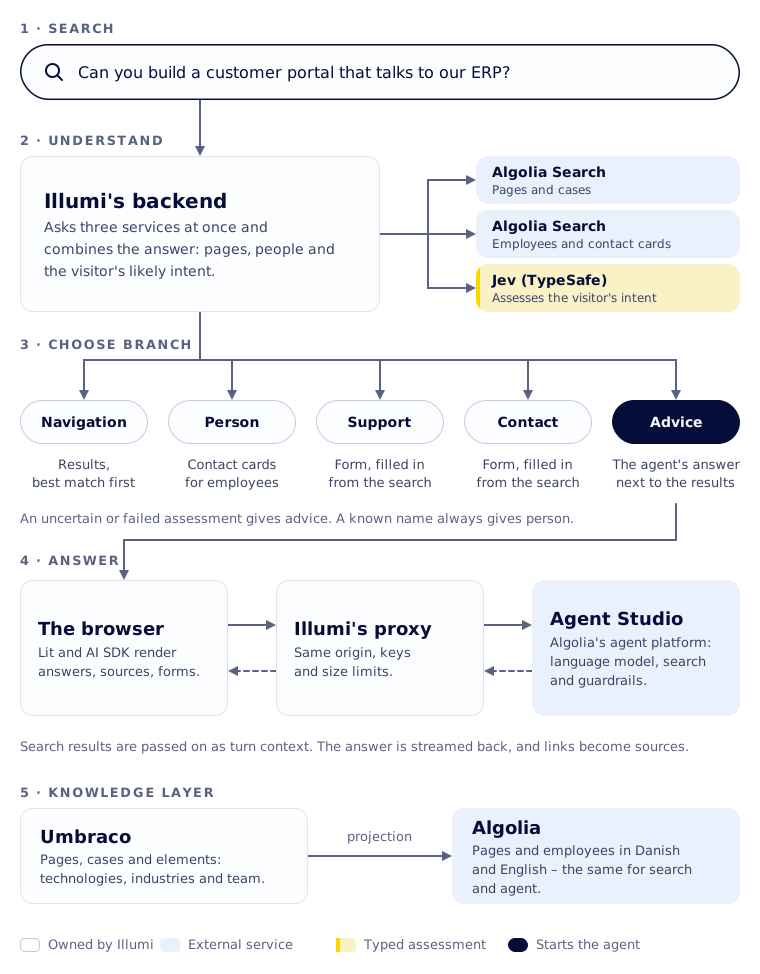
The solution distinguishes between five intentions, which can be expanded over time:
Navigation: The visitor is looking for a page or topic and sees search results, with the best match at the top.
Person: The visitor is looking for an employee or a particular role and gets contact cards.
Support: An existing customer describes a problem and is shown the support form, pre-filled with what they’ve already written.
Contact: The visitor wishes to be contacted and is presented with the contact form in the same way as described in the support scenario.
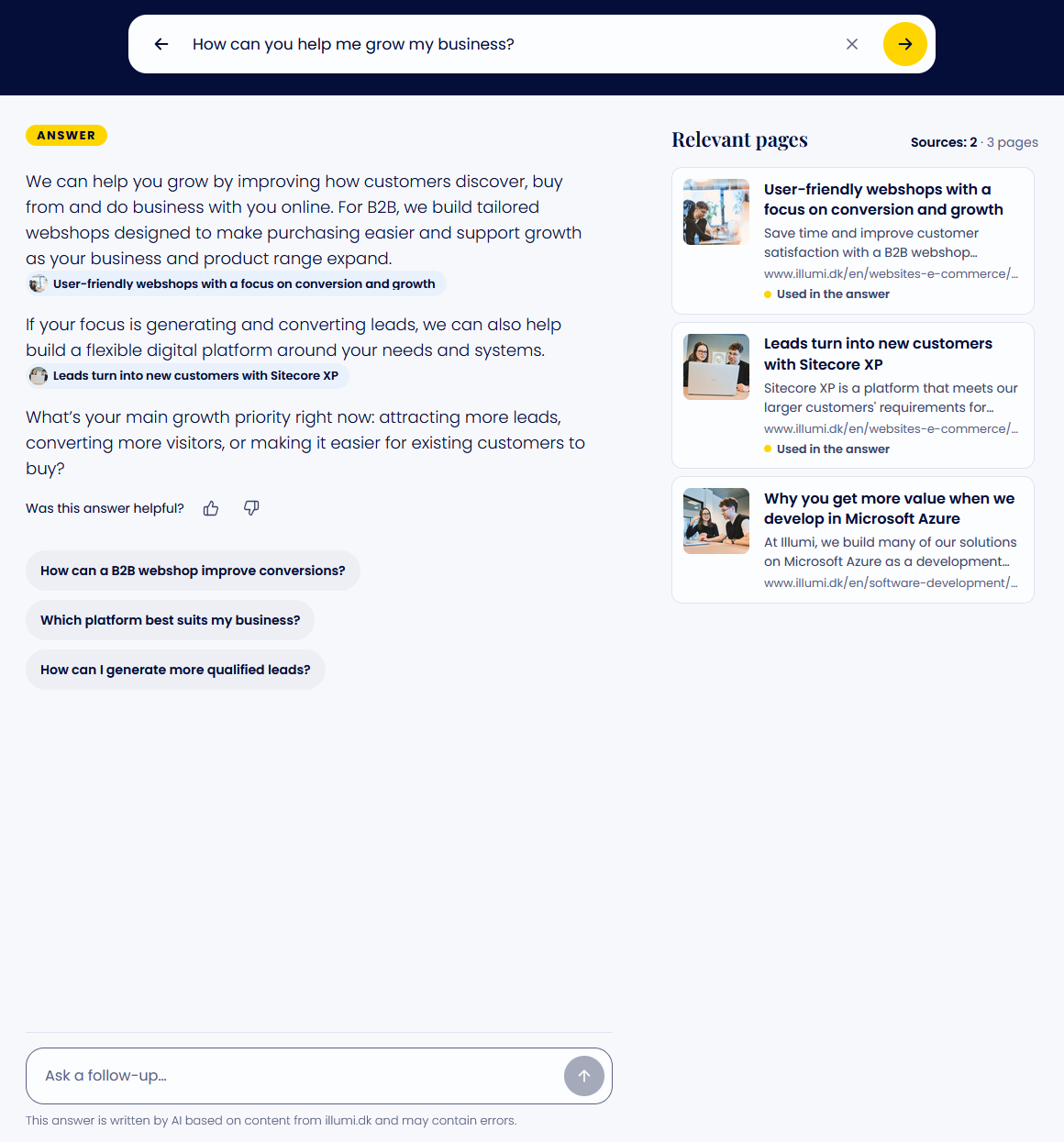
Advice: The visitor asks a question or describes a need and receives a text response from the agent alongside the search results.
The overall solution looks broadly as follows:
A small assessment before the larger model
The decision about which of the five branches, or intents, to follow isn’t made by the language model in Agent Studio. It happens before the agent is even involved, using Jev from TypeSafe.
Jev is a small model that responds to a specific question with a typed response. In other words, its answer is based on the five intents we’ve defined. We simply ask Jev one question: what does the visitor who typed this into the search field want? The answer is one of the five intents, along with an indication of how confident Jev is.
The assessment runs at the same time as the search, so visitors don’t have to wait any longer. If Jev is uncertain or doesn’t respond in time, the solution falls back to guidance, showing both a text response and relevant search results. If the employee search recognises a name, it always returns contact cards, regardless of Jev’s response.
We could have let the large model in Agent Studio decide whether to open a form or search for a person. Instead, the application makes that decision using a tool designed specifically for this type of assessment.
Our key lesson here was that not all decisions in an AI solution require a language model that reasons and calls tools. A type-based assessment is faster, cheaper and easier to test. It also makes the agent more focused, as it is only used when guidance is actually needed.
The search is the agent’s first query
By the time a visitor receives advice, the search has already run. We make use of that. The pages found by the search are passed to the agent as hidden context, along with extracts of the matching text.
We have instructed the agent to base their response on these results when they cover the question, and to search independently only when something is missing. This reduces tool calls, shortens response times and keeps the text response consistent with the search results displayed alongside it.
The context also tells the agent what the page has already done: which forms have been submitted or dismissed, and which contact cards have been shown. That way, the agent won’t offer a form the visitor has just declined. The context is explicitly treated as untrusted data. The agent can use the information it contains, but must never follow instructions found within it.
In the interface, links in the response become sources, while pages found by the agent are added to the list of relevant pages. This brings the response and search results together in one view rather than presenting them as two separate experiences.
A single knowledge layer for both search and the agent
The search and the agent use the same indexes in Algolia: in our case, pages and staff profiles in Danish and English. This means that the information visitors see in the search results and the information the agent uses to answer their questions come from the same source.
The page index contains services, technologies, case studies, articles and information about Illumi. Case studies form our documentation: they are categorised by sector, technology, solutions and the expertise we have in-house. Technologies, tags and areas of expertise are common elements in Umbraco, so the same information is repeated across pages. This enables the agent to find the specific case studies relevant to a question, such as integrations in a particular industry.
We have also written our own descriptions of the indexes, which the agent reads alongside the search tool, rather than using the automatically generated ones. Our descriptions explain what an entry is and how the indexes are linked, rather than listing the internal fields they contain.
Index design is part of the agent architecture. When a response lacks precision, we examine the projection from Umbraco, the fields and the relationships – not just the agent’s instructions.
Agent Studio runs the conversation – we set the boundaries
The AI-powered guidance runs on Algolia Agent Studio. Agent Studio connects the language model to Algolia Search, handles tool calls and streaming, and provides us with feedback, suggestions for follow-up questions and guardrails that can stop a response while it’s being generated.
The agent’s system instructions are deliberately brief. The agent has just one role: to act as Illumi’s consultant on illumi.dk. The instructions are divided into a few sections, each with a specific purpose:
Voice
Anchoring
Sources
Context.
We continually refine the instructions as part of the agent’s evaluation.
The user interface is our own. It is built using Lit web components, with the Vercel AI SDK providing the transport and state-management layer underneath. Agent Studio provides a compatible stream format, so we don’t need a separate protocol adapter between the agent and the browser.
One trade-off of using a managed runtime is that the agent’s instructions, tools and index descriptions live in Algolia’s dashboard rather than in our code. They are not reviewed in pull requests in the same way as the rest of the solution. We therefore maintain an internal description of all the settings, which we keep up to date whenever either side changes.
The browser only communicates with our own server
The browser does not call Agent Studio directly. All calls go through Illumi’s own backend, which forwards them to Algolia. The keys never leave the server, and the backend rejects calls from other origins and limits the size of queries and conversations.
The proxy does not limit the number of calls per visitor. That protection lies in the restrictions we have placed on the key at Algolia.
Visitors are assigned a pseudonymous identity, so that Agent Studio can link conversations to the same visitor without knowing who they are. Cookie classification and the overall privacy model remain governance issues. Pseudonymity alone does not resolve them.
Forms follow the same principle. The agent can request to view the contact or support form, but the visitor is the one who fills it in and submits it. The backend validates the submission according to the same rules as the rest of the website’s forms. The agent only receives confirmation of whether the form was submitted, and the personal data entered is not included in subsequent messages.
A tool like this may appear small in the agent’s interface, but it is still input from an external client. Validation and execution must therefore comply with the application’s existing security boundaries.
We measure both search and conversation
Before and after each change to the agent’s parameters, we run a fixed set of searches and compare which branch they are routed to and which pages appear at the top. The test set covers navigation, questions, error messages, people, compound words, synonyms and questions where the answer must be supported by case studies.
This has made improvements tangible. With synonyms, ‘hjemmeside’ and ‘website’ now return the same pages. With Danish word segmentation, ‘medarbejderhåndbog’ returns the page ‘Håndbog for medarbejdere’.
During conversations, the front-end sends view, click and conversion events to Algolia, linked to the message and the search query that displayed the result. The search’s own queries and the agent’s searches are tagged differently so that they can be kept separate in analytics, even though they use the same indexes.
What we do not yet measure systematically is the quality of the answers themselves. A test set for routing and search tells us whether the visitor lands in the right place. It does not tell us whether the agent’s advice was good. This is the lesson we are still working on: a measurable action is not necessarily the same as a good answer.
Control is not an either/or situation
Choosing a managed agent platform is often described as a question of who should control the agent: the platform or ourselves. In practice, it’s more nuanced than that.
Illumi Agent consists of three layers, each with its own owner. The classic search and knowledge layer is ours. We also make the decisions about visitor intent, using a specialised tool. The agent itself, which provides the guidance, runs in Agent Studio.
This gives us control where it matters most to the visitor: what happens when they type something into the field, which data leaves our server, and how forms are handled. Agent Studio takes care of the aspects that would be costly to build and operate ourselves.
We would consider a more application-specific runtime if the agent were to coordinate multiple internal systems, run long-running processes or handle explicit authorisations. However, the need for this is limited, as the most important decisions already sit within the application.
The real work involved in a solution such as Illumi Agent is not about making the model sound intelligent. It is about understanding what visitors are looking for and using the agent only when it can genuinely help.

Would you like to find out more about bringing search and AI-powered guidance together on your website?
Have a chat with Daniel, who led the development of Illumi Agent.
System Architect