
Google link attributes
Link-building can have a strongly impact your online success
Get insights into how to use Google’s link attributes, as well as tips on what to do with backlinks that harm your rankings.

Nofollow, sponsored and ugc
Link building is an off-site SEO technique that can have a big impact on your online success. At first glance, many will probably think that a backlink means more traffic to the site. We can't argue with that, but there is another and more important reason why you should work strategically with link building - PageRank!
Search engines - such as Google - place a lot of weight in their ranking algorithms on the links pointing to your website.
Previously, it was the quantity of backlinks that was important for ranking, but today it's much more about quality rather than quantity. That's why it's important that you critically analyse the backlinks you have or are trying to get. This applies to both purchased backlinks (we'll come back to those) and those you've earned through a good article or comment.
The changing focus on the quality of a backlink has created a desire to better identify in what way and in what context links are used. This also makes it easier to assess what value should be transferred through a link and how it should affect the linked page in a search result. Therefore, Google has defined some new guidelines for backlinks, which you can read more about later in the article.
What are backlinks?
Basically, a backlink is a reference from one website to another. You get a backlink when your content is so good and relevant that other websites will send their users in your direction. The math is simple. More relevant recommendations contribute to a higher PageRank, which means you're more likely to rank well in an organic search result when someone searches for something related to your content.
What is PageRank?
In short, PageRank is an algorithm that calculates a score of a given web page. The score influences the ranking Google gives your page in a search result, but PageRank is just one of many algorithms that determine whether you get first or last place in a search result. Learn more about ranking and SERP
Backlinks have a big impact on your PageRank
It's Google's Bot Crawlers that identify and follow your backlinks. In the process, Google - depending on the sender - assigns a value to your backlink, which has a major impact on the page rank of the page the link points to. Therefore, you don't want to get backlinks from domains or pages that Google considers to be rogue or lack sufficient authority in the field.
So far, we have had the option to set a <nofollow> attribute on a link that Google should not value in relation to page rank. In practical terms, this means that Google Bot Crawlers do not follow your link and thus do not transfer either positive or negative PageRank. All links that do not have the <nofollow> attribute are considered <dofollow> links by Google Bot Crawlers, and they will follow the link to your page and assign it a value based on the authority of the sender domain and the attributes associated with the link.
When to use <nofollow> attributes?
the <nofollow> attribute is used on backlinks you get from:
Blog comments (forward <ugc>)
Social media (post links)
Blogs or news sites
Links from press releases
Many popular websites use <nofollow> attributes by default on all their outbound links:
Quora
YouTube
Wikipedia
Reddit
Medium
Google's two new link attributes
Google has just introduced two new link attributes to help identify the nature of a link, but also give a hint about the degree to which the link should affect your PageRank.
The new attributes are:
rel="sponsored"
rel="ugc"
You can and should still use the <nofollow> attribute, but going forward you can also make use of these two new ones, either alone or together with <nofollow>.
rel="sponsored"
According to Google Webmaster Guidelines, it's your job to ensure that a backlink in the form of an advert for your company does not affect a search result. Therefore, the link must be tagged correctly to avoid penalty points from Google and a drop in the search results.
If you are paid to put a link on your website or you buy a mention and a link from another website, this should be marked as "sponsored" going forward. It must be visible to the user that the content is sponsored, and a link attribute must be added that tells the bot crawlers that it is a paid/sponsored link. Specific examples follow at the end of this section.
At Illumi.dk, we occasionally publish articles where we link to more knowledge about a specific topic or a specific tool. When we link to external sources, it is because we believe that the content supports or expands what we have written about the topic. The link can therefore be considered our recommendation of the content we link to.
Because it is our recommendation, which we have not been paid to provide, we do not need to add either the <nofollow> or <sponsored> attribute.
The situation is different with affiliate websites, which are websites that primarily generate revenue by promoting other people's products or brands. This can be done in many different ways, some more sophisticated than others.
When links become a business
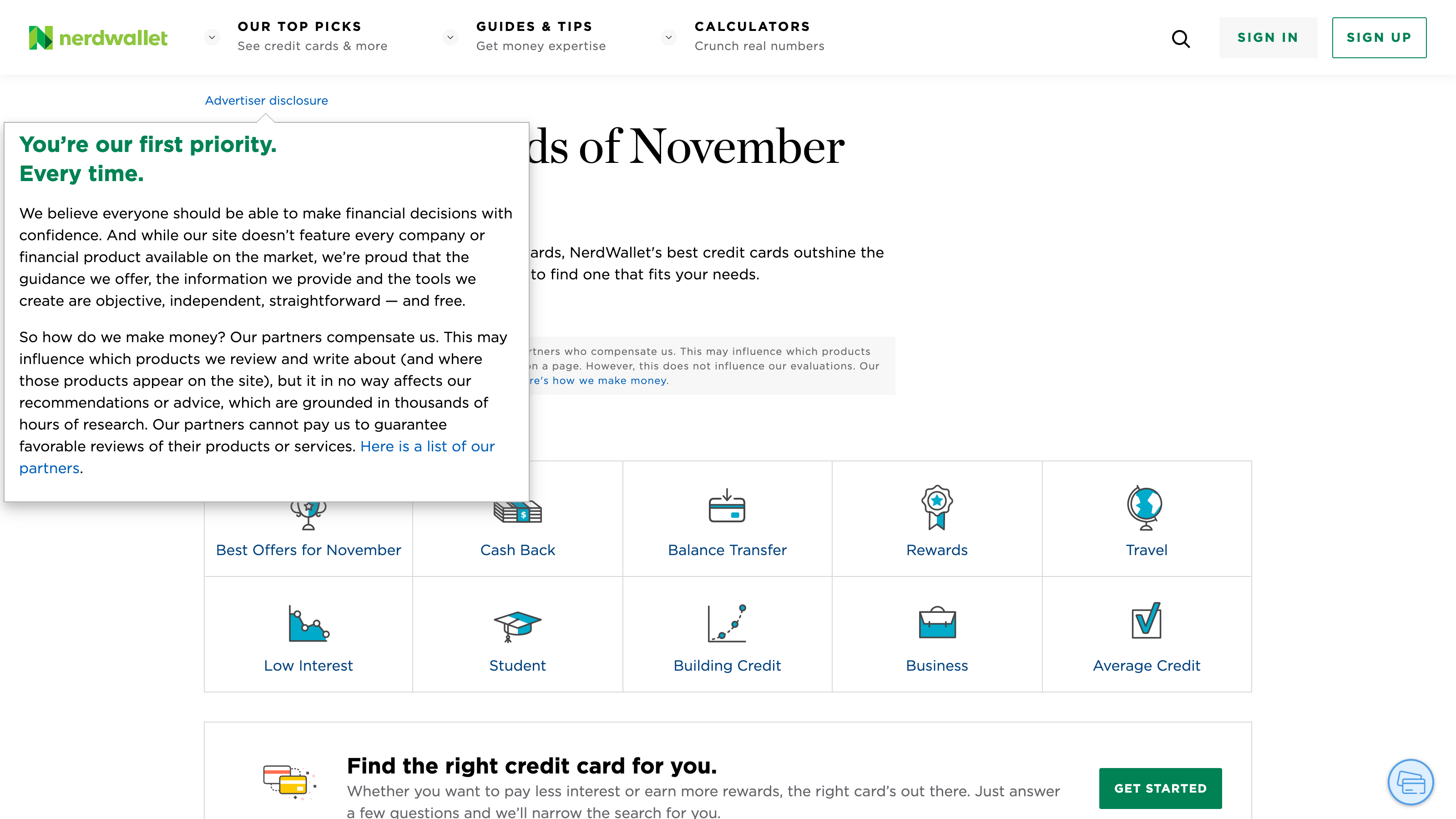
Nerdwallet is an affiliate website that primarily blogs about finance and personal finance. They want to be seen as an objective and trustworthy source of advice and guidance on financial matters, but at the same time they make no secret of the fact that they have a large partner network that pays for publicity on the site.
They use the <nofollow> attribute on all links to the partners' product pages, and at the same time they have a clear disclaimer stating that the way the different products are displayed and which products are mentioned is influenced by the compensation Nerdwallet receives from the respective partners in the network. Going forward, they should also have the <sponsored> attribute on links to partner network product pages.
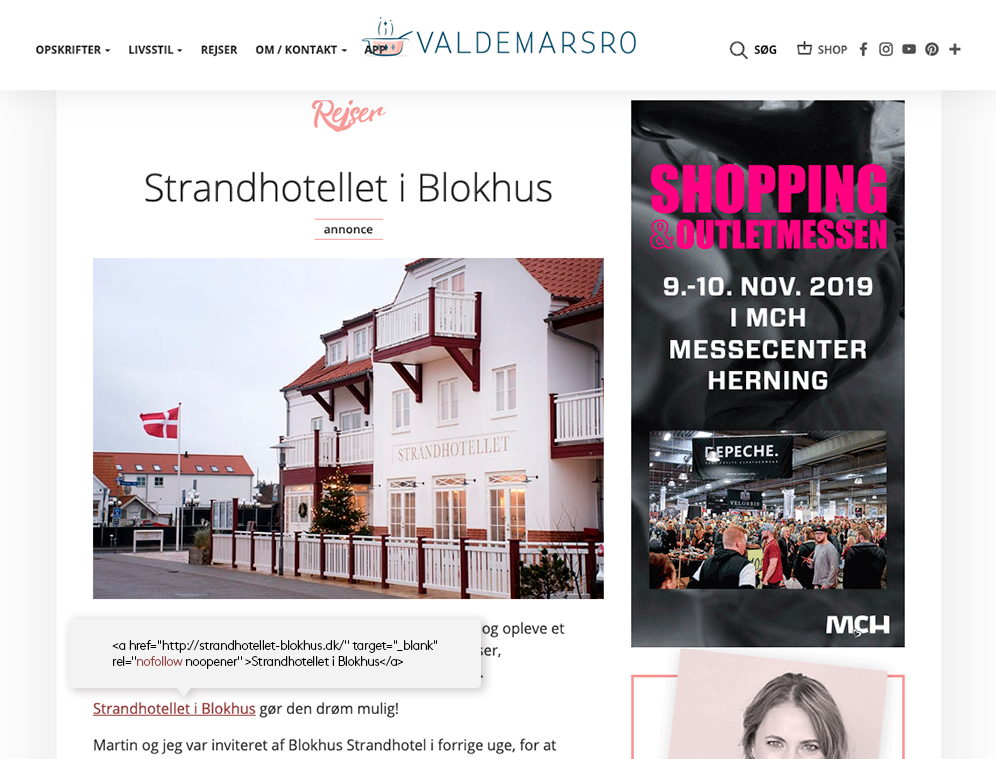
Another example is the blog Valdemarsro.dk. Valdemarsro.dk was originally started by a passionate food blogger and today has 1.7 million unique readers per month. This makes the blog attractive in a marketing context and the passionate food blogger now makes a living from his blog.
The success is based on a good balance between sponsored content and traditional content, while at the same time providing full transparency, so there is no doubt about when it is one or the other. Since blogs typically get the majority of their traffic from searches in Google, for example, incorrect or missing use of link attributes can damage your page rank and thus your entire business foundation.
rel="ugc"
Today, the vast majority of blog, debate and forum systems automatically assign a <nofollow> attribute to links in comment tracks. In the future, these types of links must be specified with the link attribute <ugc>, which stands for User Generated Content.
WordPress has just announced that they will adopt the new attribute on blog comments in the next update coming in November 2019, and we will probably see it implemented in most common content management systems in the near future.
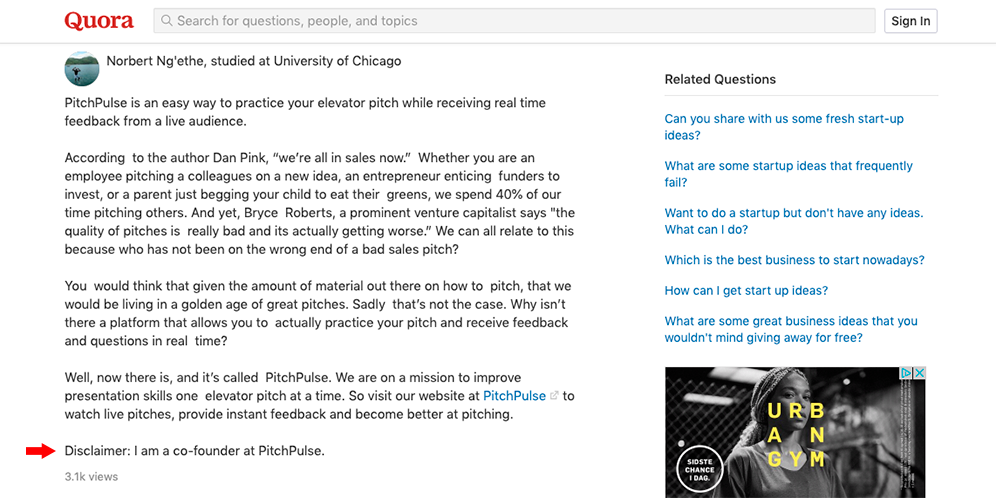
Here's an example of best practice in a comment track on Quora. Even though the <nofollow> link is automatically attached to the links provided, the sender has still added a disclaimer at the end explaining the connection between the sender and what is being linked to. This is good style and in line with Google's desire to understand the intent of a backlink.
What does it mean for SEO?
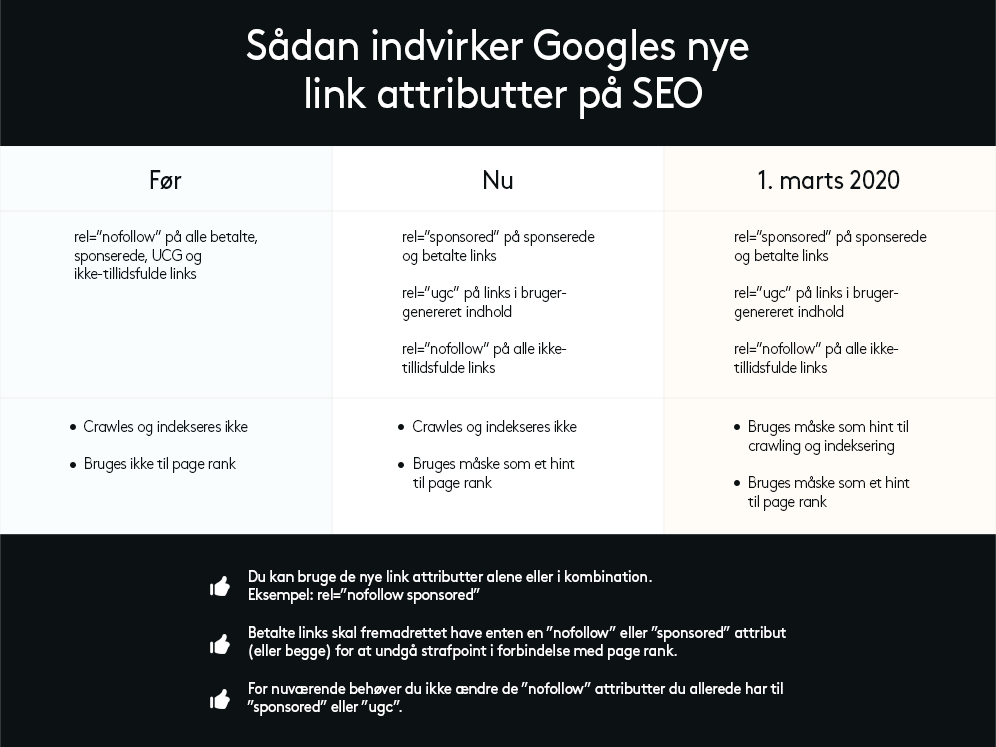
At this point, it's too early to say how much of an effect the new link attributes will have on page rank. What we do know is that Google has already started to perceive a <nofollow> attribute more as a hint or encouragement not to follow the link, which means that in some cases Google will actually follow the link and perhaps also transfer page rank.
This overview from MOZ shows the changes in Google's new link policy.
Where can I find information about my backlinks?
There are many great tools that can tell you who is linking to your pages and whether they are marked as <dofollow> or <nofollow>.
Here are a few links to great tools that can give you a quick overview at no cost. If you want to dig deeper into your backlinks, both tools require a subscription.
Tool: Neil Patel | SEO Analyzer
Google Search Console also provides information about your backlinks - and it's completely free. Google doesn't reveal markers such as domain and page authority and spam scores, but you do get the full list of backlinks, link texts and domains that link to your website.
In order to track your backlinks, your website must be connected to Google Search Console.
Link building is a slow process - there are no shortcuts if you want to protect your domain authority. Strong backlinks are primarily earned through high-quality, shareable content, and you should avoid using questionable methods to achieve them.
What do I do with suspicious backlinks?
Most websites occasionally get backlinks from suspicious domains. You don't necessarily need to panic about this. Google is pretty good at identifying spammy links and will probably not let it affect your ranking.
To be on the safe side, you can regularly check your backlinks and the domains that link to your site. If you have a lot of domains that look like spam, you should act on it. Here are a few examples of suspicious domains from our own backlink list.
avdqiscounters.cf
belhitungi.ga
seongiarei.tk
sexyvids.top
How to disavow unnatural backlinks to your website
Create a list of the backlinks or domains you want to disavow. Save the list as a .txt file.
Go to Google's disavow tool
If you're logged in to Google Search Console, your website domain will be pre-populated. If not, follow the instructions to verify domain ownership. Click the "disavow links" button.
Upload your file with links to be disavowed.
Although it's a simple process, it's a good idea to read Google's guide to disavowing backlinks before you get started. There are a few requirements for how links and domains should appear in the list to be recognised and approved.
Read more about Google's new link attributes
Article: Evolving "nofollow" - new ways to identify the nature of links
Article: How Google's Nofollow, Sponsored, & UGC Links Impact SEO
Want to know more?
Here you'll find inspiration and knowledge about everything related to your online presence.

SEO & GEO
We build websites that Google's search robots understand
We optimise your solution's performance and make it understandable to search engines when they crawl the site prior to indexing.

Keywords in web texts
How to use keywords in your web texts
Drive more qualified traffic to your website with the correct use of keywords in your web texts.

SEO and headings
SEO and headings
What are headings and how do you use them correctly so that search engines understand your texts?

Newsletter
Sign up for our newsletter
Get digital trends and opportunities delivered straight to your inbox.

Introduction to web accessibility
Introduction to web accessibility
When your website is accessible, all visitors have a good experience, which benefits both them and your business.