
Piwik Pro
Alternative to Google Analytics? We recommend Piwik PRO
What about Google Analytics - can you use it or not?
Looking for an alternative tool to measure and report online activity? Here’s our take.


In recent years, much has been written back and forth about the use of Google Analytics in the EU. First it was on the verge of becoming illegal. Then it became illegal. And then - maybe - it became legal again with the new Google Analytics 4. Or did it?
If you're confused, it's no wonder. Even for seasoned GDPR and European law nerds, it can be hard to make sense of it all.
Our recommendation is clear: Use an analytics tool where you own and have full control over the data collected. This gives you peace of mind that you can comply with legislation both now and in the future.
We have researched the market for alternatives to Google Analytics and have become very enthusiastic about Piwik PRO. There are many reasons for this, and it's not just about who owns the data.
Stay tuned; we'll explain why.
Familiar user interface
Piwik PRO is similar to the "old" Google Analytics (also called Universal Analytics or Google Analytics 3 - dear analytics tool has many names). The user interface is very much the same, so if you've loved Analytics 3 in the past, you'll love Piwik PRO too.
Most of the predefined dashboards and reports that many people loved in Analytics 3 are easy to pick up again in Piwik PRO. Many metrics even have the same name. So if you want to get an overview of audience, acquisition and behaviour, just jump into Piwik PRO and get it there.
User Flow as you know it
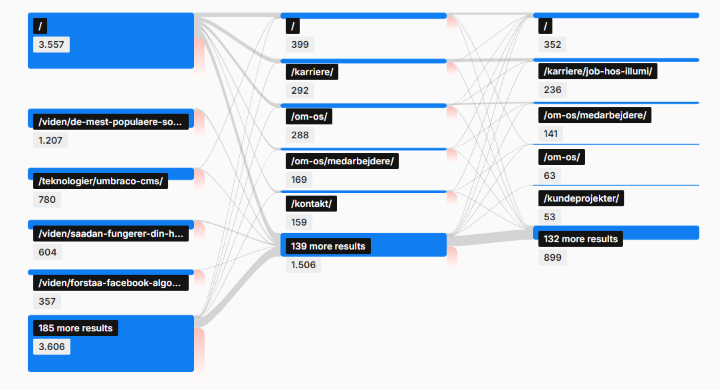
One of the special features in Piwik PRO is User Flow, which also existed in Google Analytics 3. With User Flow, you can see for each page - or for the entire website - how users move through the information on the site. User Flow makes it easy for you to analyse user behaviour and investigate which pages create the most engagement with users.
Flexibility
Many of our customers find it easier to get started with Piwik PRO than with Google Analytics 4. This is partly thanks to the many standard reports that provide enough insight for most people. If you have more advanced needs, it's relatively easy to set up additional reports in Piwik PRO.
Overall, you can customise reports, dashboards and even data collection to suit your company's unique needs. This means that as a Piwik PRO user, you can make reports look like Google Analytics 3 if you wish.
It's also easy to get data out of Piwik PRO. We meet many companies that want to be able to extract a sample of their data - for example, "users this year" - so they can continue working with the data in Excel.
With Piwik PRO, you can connect directly from Excel to Piwik and just update the Excel sheet when you want the latest data. If you want to avoid exporting the same data over and over again, Piwik PRO is your new best friend. The easy export also makes it easy for you to use the data together with data from other sources, for example in interaction with Power BI.
If you want detailed insights into the customer journey, you may want to take a look at Google Analytics 4. The tool is designed to track even the smallest actions users take - across mobile apps and websites. Therefore, you potentially gain a deeper insight into the overall customer journey. However, privacy initiatives from Apple have made it much harder to do this tracking in practice, and many also find it super complex to set up reports that provide the desired insights.
Integration with Google Ads and Search Console
Google Analytics 4 is naturally integrated with other Google services like Google Ads and Google Search Console. Many companies use these services and are afraid of losing the synergy if they choose another analytics tool.
But you can put this worry to rest. Piwik PRO offers integrations with a wide range of services, data sources and data storage solutions, so you can build reports with data from both Google Ads and Search Console.
High data quality
One thing that annoys us in Google Analytics 4 is that you can't always trust the summarised data. If you've been playing around with Analytics 4, you may have noticed some yellow and red warning triangles that alert you to this when problems occur.
It's very nerdy why this is the case, but the bottom line is that in some cases Analytics 4 is sampling data, i.e. using a random sample of all your collected data to create a representative subset that is analysed and presented in the reports.
The challenge with sampling is that inaccuracies can occur in the results you get presented. For example, if you look at visitor data by country, it doesn't necessarily add up to 100%. They do in Piwik PRO. This gives you real and valid insights into the online activities you want to analyse.
Longer history
If you have a seasonal business, it's beneficial to be able to compare data from several consecutive seasons. For example, you might sell cold drinks or swimwear and want to compare data from the past two summers. In this case, you will sometimes fall short with Google Analytics 4, which only keeps your data for 14 months. If you want longer storage, you need to buy a BigQuery database or upgrade to Google Analytics 4 365, which you have to manage from a new location.
That's why many of our seasonal customers choose Piwik PRO instead, which in the enterprise version stores your data for 25 months or longer. It's not free, as the enterprise version costs money, just like Google Analytics 365, but in return you manage everything related to your data in the Piwik PRO interface, so you don't have to learn more tools.
Full ownership of data
The whole controversy surrounding Google Analytics started because the EU has strict requirements for the processing of personal data and personally identifiable data. Analytics 3 did not meet these requirements, which they have tried to rectify with Analytics 4.
The problem is that they still own your data. Or more precisely: they own your customer data. And you are ultimately responsible for ensuring that this data is processed according to current Danish and European legislation. This can be difficult when Google doesn't want to relinquish ownership.
Piwik PRO is a Danish-established company that has always prioritised data security and user rights. For example, Piwik PRO has a built-in Cookie Consent Manager and Tag Manager, which ensure that users are only exposed to what they consent to. In addition, you get easy access to modify or delete user data directly in the interface, so you can protect your users' privacy.
And as mentioned, you own the data you collect about your customers. Companies operating in sectors with strict data protection requirements therefore have a special incentive to look towards Piwik PRO.
Hosting in the EU - possibly on your own servers
You may have heard a lot of controversy about Google storing data on servers in the US. We won't go into whether that's really a problem here, but if it's something you're worried about, Piwik PRO basically hosts your solution on cloud servers located in the EU. If you wish, you can (with the paid version of Piwik PRO) also choose to host the solution yourself.
Conclusion
The choice between Google Analytics 4 and Piwik PRO largely depends on your organisation's specific needs, goals and values.
Google Analytics 4 is ideal if you want advanced, user-centric analytics options and have all the skills to set them up and maintain them.
Piwik PRO, on the other hand, is the obvious choice if your business prioritises data control and privacy, and if you're either happy with good standard reports or want to be able to easily customise reports and dashboards to your unique requirements.
At Illumi, we often find that the choice falls on Piwik PRO when you are challenged by the interface in Google Analytics 4 and cannot find answers with the same ease as you could in Analytics 3.
In addition, many people choose Piwik PRO when they want to display web analytics data in Power BI in order to combine it with other data in the organisation, such as sales data.
We help with setup and consulting in both Google Analytics 4 and Piwik PRO, and ultimately you should choose the solution that best addresses your unique business needs.
We keep up to date with market opportunities, so don't hesitate to get in touch if you'd like to talk about what's best for your business.

If you want to know more about web analytics, contact
Digital Marketing Consultant
Andreas Gaardsted Vad
Get more knowledge

Bounce rate
What is a bounce rate?
What is a GOOD bounce rate? Where is it found in Google Analytics? And how can you improve it?

Open Graph Tags
Use Open Graph tags when sharing on social media
Open Graph Tags allow you to define the information shown when someone shares a link to your page.

Google SERP
Optimise your visibility in Google SERP
Learn what's in the SERP and what you can do to optimise your visibility in the search results.

Introduction to web accessibility
Introduction to web accessibility
When your website is accessible, all visitors have a good experience, which benefits both them and your business.