
Schema Markup
Schema Markup - the beginner's guide to structured data
Find out what Schema Markup is, how it increases your digital visibility and how to implement it on your website.


What is Schema Markup?
Schema Markup is an important addition to your other SEO and GEO work. Not only does it make it even easier for you to appear in search results, it also increases the chance that the search results you appear in will be clicked.
Schema markup is also called structured data. It's a form of code you add to your web pages to tell search engines and AI crawlers exactly what your content is about. For example, that you offer service A in area B at price C.
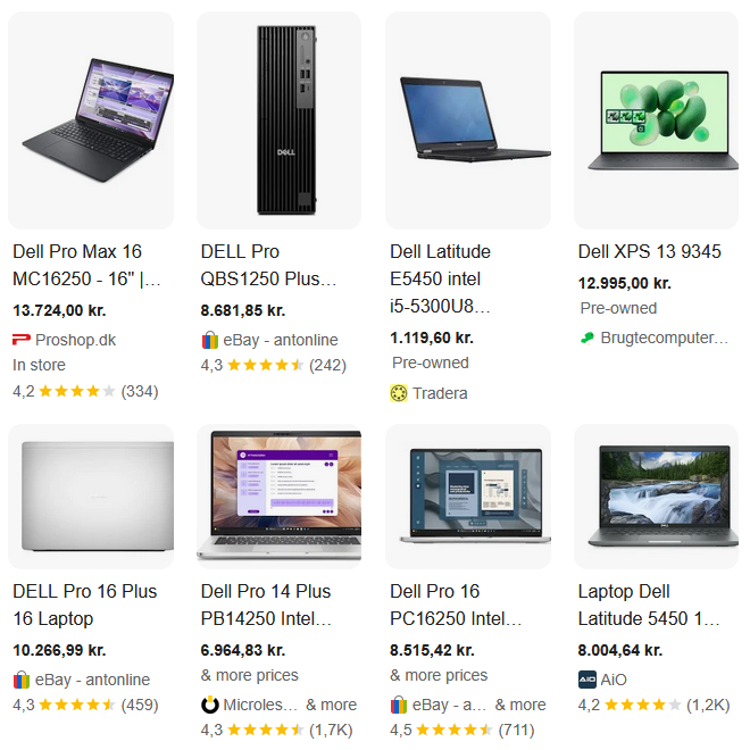
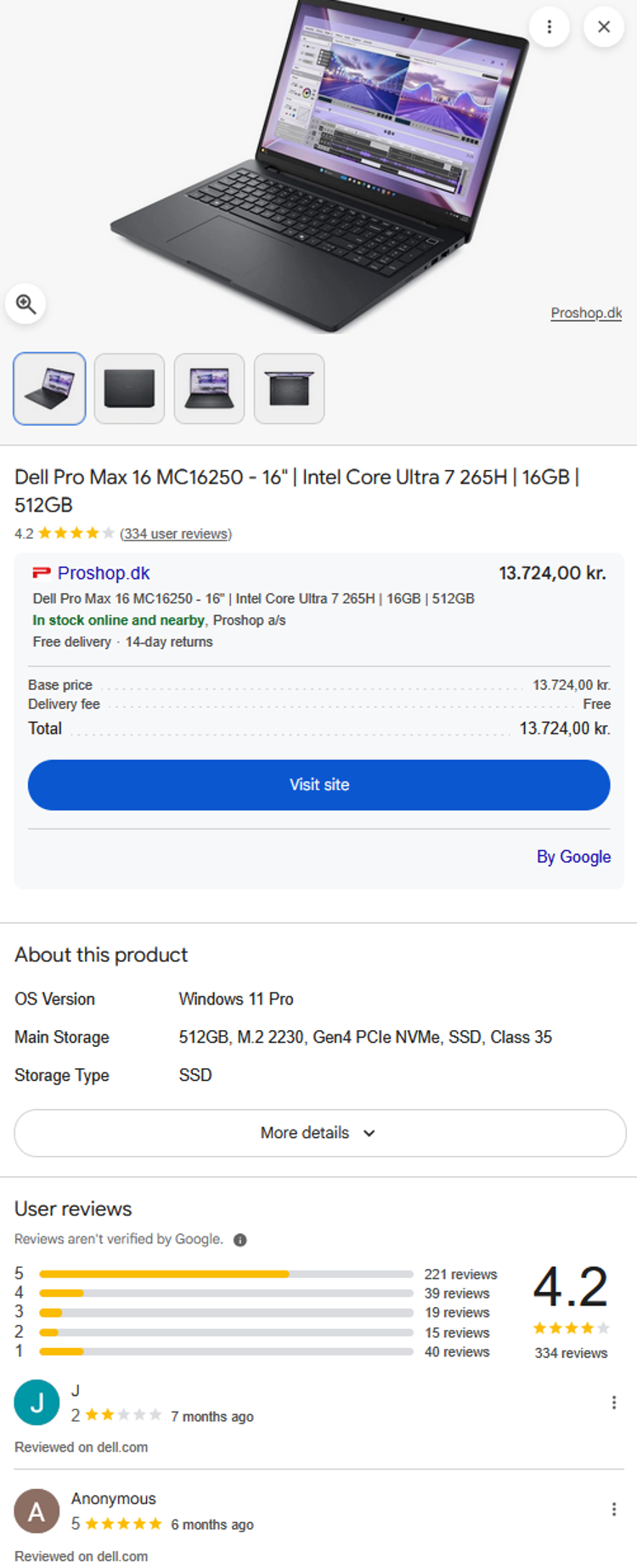
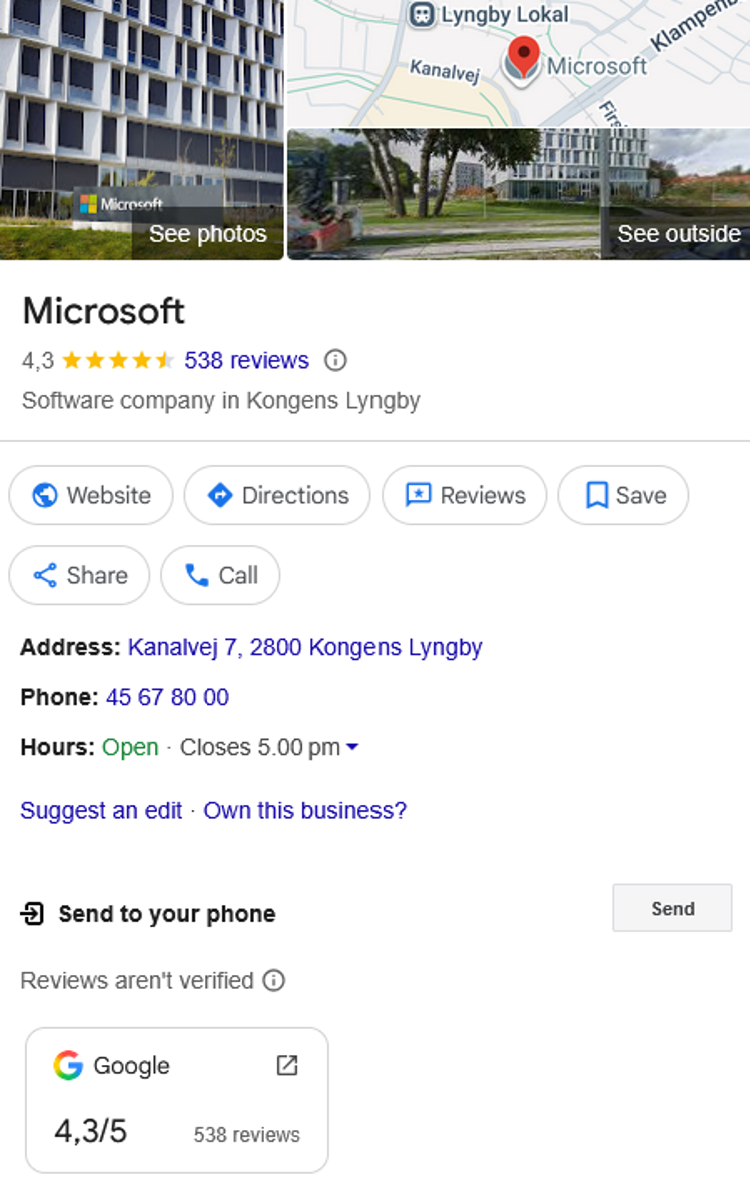
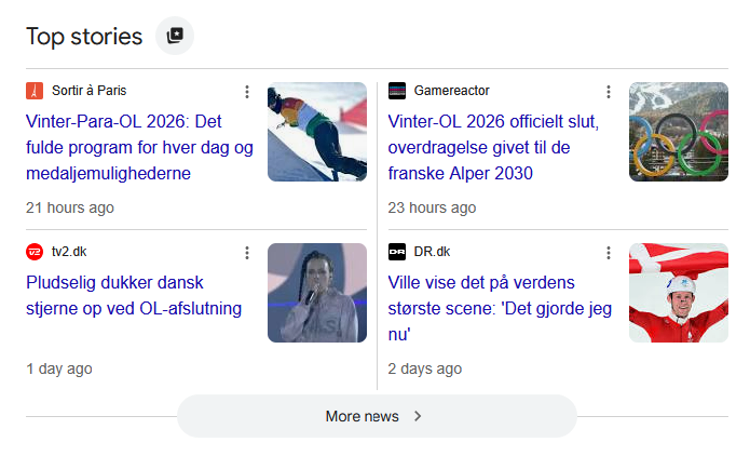
You've definitely come across search results that are enriched with Schema Markup. Let's take a few concrete examples.
You may have searched for "hotel in Aarhus" and amidst a bunch of similar-looking text ads, you see these search results:



In the examples above, Schema Markup has been used to feed the search engines with data. In the last of the examples, Harbor Towers has used Schema Markup to tell search engines that it is a hotel by the harbour in Aarhus with free parking and 4-star ratings based on 483 reviews and a price starting at DKK 885 per room. These are all examples of data that is structured so that search engines understand and present the content correctly.
Why work with Schema Markup?
Without Schema Markup, Google and other search engines have to interpret the text and images on your website themselves - but when you provide them with structured data, you cut through your content and tell them directly what each page is about.
We all like it when our work is made easier for us. This is also true for search engines. So if you want to help search engines help you (aka make you more visible and clickable), Schema Markup is an absolute must.
What's more, Schema Markup can indirectly boost your SEO by increasing click-through rate (CTR). Enriched search results often get more clicks than regular search results and this can improve your overall rankings over time. So while Schema Markup isn't a direct ranking factor, it can have a positive impact on your ranking.
There are many different types of Schema Markup. Let's take a look at some of them.
Schema markup types


How does Schema Markup increase your digital visibility?
Schema markup enriches your web content with details that make your search results bigger, more visually appealing and easier to decode than standard text without markup. This increases the likelihood of you being seen - and clicked on. So it's not necessarily about getting higher in the search results, but about becoming more visible and appealing.
Rich snippets - your advantage in search results
All the examples above illustrate search results that are enriched using Schema Markup. This type of enriched information is called rich snippets - and the search results as a whole are called rich cards.
As the examples show, rich snippets can be about many different things - even more than we have shown here. For example, your search results can be enriched with:
Event dates and descriptions
Publication dates for articles
Authors of books or blog posts
Stock status
FAQs (questions and answers)
The possibilities are many and depend on what you as a company or organisation want to highlight and be found on. But whatever data (snippets) you enrich your pages with, it's your opportunity to make your products, services, articles, etc. appear particularly interesting.
Your rich snippets don't just appear in rich card views. They also increase the likelihood of you being highlighted in other Google features, such as:
Knowledge Panels (the "fact boxes" or "information boxes" you often see on the right side of Google search results (desktop) when you search for a specific company, person or brand).
Voice search answers (the answers Google reads out loud when you ask a question by voice via Google Assistant, for example).
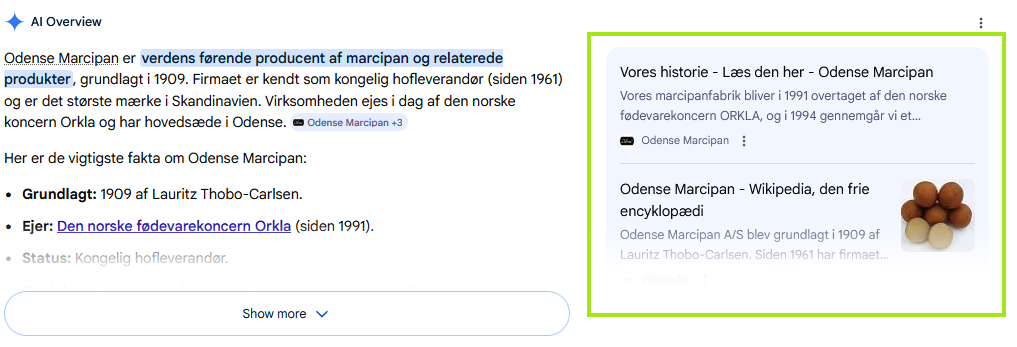
Featured snippets (the answers Google often displays to the right of any AI Overview answer. The content is quoted directly from a website and the highlighting acts as an endorsement of that website for many users).
How do you implement Schema Markup on your website?
This is where it gets more technical, but let's dive in.
You can add Schema Markup (structured data) to your website in several ways. We (and Google's own Schema Wizard) recommend using the JSON-LD (JavaScript Object Notation for Linked Data) format. We do this because you don't have to change the HTML structure itself and because it's easy to read and maintain.
Here is an example of how you can add simple structured data about your company in the form of the company name, URL and logo:
<script type="application/ld+json">
{
"@context": "https://schema.org",
"@type": "Organisation",
"name": "Example Company",
"url": "https://www.eksempel.dk",
"logo": "https://www.eksempel.dk/logo.png"
}
</script>
As you can see, you should always start by specifying the type of structured data you are providing. This helps the machines to immediately understand what your content is about. Search engines and AI crawlers don't have eyes like you and me. They can't just look at your page and realise it's about an organisation. By specifying the "Organisation" type, you help the machines so they don't have to go through the entire page to interpret and understand your content.
The most common Schema Markup types
Here are some of the most common Schema Markup types that you can benefit from knowing:
Article (Article)
Used for news, blog posts and expert guides - e.g. with title, author and publication date.Person (Person)
Defines people in the organisation - their areas of knowledge, authorship of pages, etc.Product (Product)
For example, with data on price, brand, stock status, etc. - especially important for e-commerce.Reviews (Review)
Show star ratings in the search results.FAQ (FAQPage)
Enables questions and answers to be displayed directly in Google search results.Event (Event)
For example with date, time, location and price.LocalBusiness
Information about your business - address, phone number and opening hours.
These types make it easier for search engines and AI services to give users the right answer quickly.
Typical mistakes and pitfalls
Schema Markup is a powerful tool, but it can go wrong if you don't know what you're doing. Some of the most common mistakes are that you:
marking something that doesn't exist on the page (e.g. FAQ markup without questions and answers)
using outdated Schema types that Google doesn't support*
making mistakes in the JSON-LD syntax.
*A good tip: Keep up to date with the Schema.org library and Google guidelinesso you always use the latest and supported markup types.
How well does Schema Markup work with all the new ways to search?
Schema Markup was originally intended for optimisation on Google and other traditional search engines. But while AI tools like ChatGPT, Google Gemini, Claude and others are changing the way we search - and presenting search results differently - there's no evidence to suggest that Schema Markup is outdated. Quite the opposite. With AI search results, voice search and intelligent assistants, it's becoming increasingly important that your data is structured and easy for machines to understand.
The more accurate and relevant your structured data is, the greater the chance that both Google and future AI platforms will understand and utilise your content.
Conclusion
Schema markup is a powerful tool in modern SEO work. It doesn't just help you get found - it increases your chances of being understood and clicked on. By giving search engines clear signals, you reduce misunderstandings, increase your chances of filling and being seen in search results, and create a stronger foundation for appearing in both traditional search results and new AI-powered search results.
If you want to make sure your site is strong and visible, Schema Markup is an element you can prioritise with clear advantage.

Need help with Schema Markup?
If you don't have the courage to add Schema Markup to your website yourself, Andreas is ready with a helping hand and an overview. Get in touch with him to hear about your options.
Digital Marketing Consultant
Andreas Gaardsted Vad
You might also be interested in

Google SERP
Optimise your visibility in Google SERP
Learn what's in the SERP and what you can do to optimise your visibility in the search results.

Umbraco Engage
Umbraco Engage
See what content your visitors are interested in and personalise it accordingly.

Keyword strategy
How to find the right keywords
Keyword optimisation is about understanding users and identifying search intent.

SEO and headings
SEO and headings
What are headings and how do you use them correctly so that search engines understand your texts?

SEO tips
Search engine optimisation tips
SEO is a business-critical discipline that you should allocate resources to.

Keywords in web texts
How to use keywords in your web texts
Drive more qualified traffic to your website with the correct use of keywords in your web texts.

img alt texts
Guide to img alt texts
Here are our top editor tips for working with img alt texts and web accessibility.

Page Speed
Page speed - an important ranking factor
Understand what page speed is and what to consider when planning your page speed strategy.

Bounce rate
What is a bounce rate?
What is a GOOD bounce rate? Where is it found in Google Analytics? And how can you improve it?

SEO & GEO
We build websites that Google's search robots understand
We optimise your solution's performance and make it understandable to search engines when they crawl the site prior to indexing.

Digital Marketing
Succeed with a marketing-optimised website
Through SEO, content marketing, and advertising, we help you drive more traffic and attract more customers.