
Knowledge-based sites
Digital dissemination of research and knowledge
As a knowledge-intensive organisation, communicating news, research, publications and more can be complex in a world where attention is limited by time.
This challenge places great demands on the UX design, which must create both an overview and motivation for users to dive into extensive material.
At Illumi, we have built solid experience in designing and developing websites for knowledge-driven organisations. We would like to share this experience and help you - as a project manager or coordinator - be well equipped to launch a new website in the best possible way.

What do you need to know?
In this article, we discuss what you as an editor need to be aware of in the process of building a knowledge and research-based website.
- What characterises a knowledge-heavy website?
- How do we create an overview?
- Can you migrate content?
- How do categories and tags help?
- External content sources
- Overview of the search result
What characterises knowledge and research-based websites?
A knowledge-heavy website often has a very broad and deep content structure, where a topic or theme can unfold into multiple categories and subcategories. In addition, there are many different content types, such as news articles, publications, scientific articles, reports, inspirational articles, authors, projects, videos, podcasts, decisions, consultation responses, etc.
The different content types often differ in terms of their master data. Master data for a publication can be, for example, author, publisher, publication date, page number, abstract and ISBN number. For a news article, a date may be sufficient.
How do we create the best overview of content?
A good and thorough process around the content architecture of the website is crucial for users to experience value from the website.
Do a thorough groundwork
To begin with, the different content types must be identified, including the associated master data. If a website already exists, it's a good idea to start by looking at the current sitemap.
Then organise the content into content clusters and types. Which ones and how many depends entirely on the goals and vision for the new website.
In the process, you should also consider the target audience and their digital habits and possibly test the information architecture in a prototype.
Present content in lists
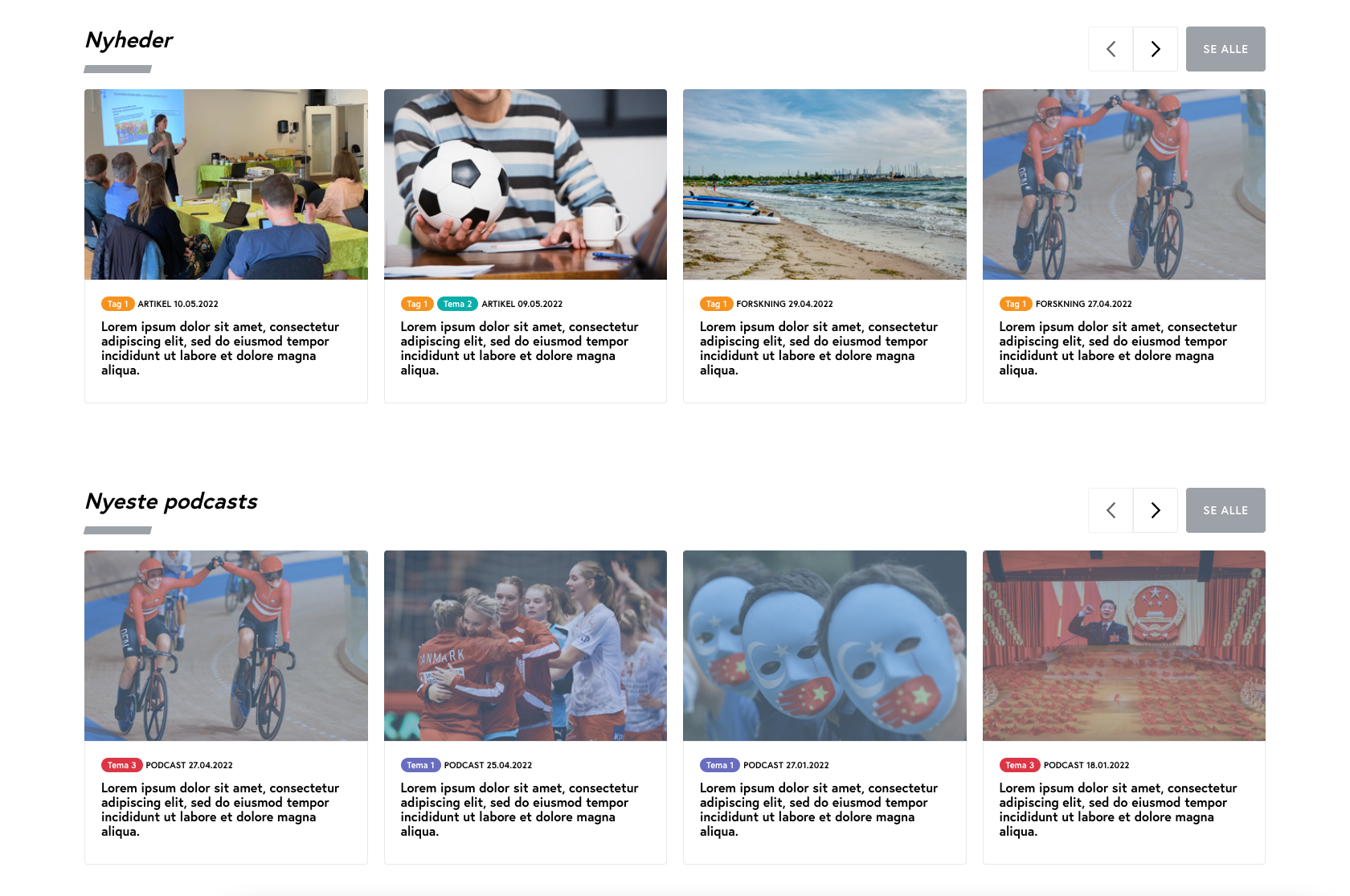
We know the concept from various streaming services, where the content in a given category is presented in tapes that you can 'flip through'.
This gives a good overview of the vast amount of content available on the services.
How generic you want the lists on your knowledge-intensive website to be can vary greatly. Some lists are built to display a specific content type and automatically put the most recent content at the top of the list.
Other lists may be built to display content from a specific category or with a specific keyword.
In some lists, you can manually select the content according to the context in which the list is displayed. This only requires that the designer has taken into account that the content types you want to display in the list may have different master data or tags.
Tagging of content
It's a good idea that your CMS allows you to tag your content pages with a category, theme, keyword or something else that makes sense to users when searching and filtering through large amounts of content.
When the content is well tagged, it becomes possible for users to filter content lists based on a keyword or theme, for example. Tags and category/theme should be clearly displayed on the content to maintain an overview.
Another advantage of tagged content is that you can easily present a list of related content on a given page.
Breakdown pages
A distribution page provides an overview of all content that makes sense to cluster together. For example, it can be a distribution page for content related to a specific theme. On the page, different bands of content can be displayed based on, for example, content type - publication, news, consultation response, etc.
Content migration
It goes without saying that if you have up to 10,000 content documents in an old web solution, it would be natural to investigate the possibility of migrating some or all content to the new solution.
The extent to which this can be done mechanically depends on both CMS and version number, but also to a large extent on the 'order' in the old content databases.
It will probably be necessary to use data mapping to ensure the old data is placed and named correctly in the new database structure.
Resources
Data migration is often a task handled by the IT department of a company or organisation, but it can make a lot of sense to bring in resources from the departments that use the data to be migrated on a daily basis. Decisions made on purely IT assumptions can ultimately prove to be critical to the business.
Integration to external content sources
In some solutions, it makes sense to integrate with external content sources. The articles are automatically retrieved and synchronised and given a date stamp indicating when the article was last updated. The articles are inserted on a page via a content module, for example, so the page can be enriched with other content such as images or cross-links to other relevant content.
In our municipality solutions, we integrate with borger.dk, for example, where we retrieve general content that is displayed on the municipality's website.
Identification of outdated content
In a large solution with many content pages, it can be difficult to ensure that all pages are up-to-date and have current and relevant content. That's why we've developed an Umbraco Backoffice feature in some solutions that makes it possible to define a rule for when content is outdated and specify which editor and/or department is responsible for a given page. The system then sends a daily email reminder with a link to the pages in question. As an editor, you can also be more proactive and pull a list of your pages that have not been edited for, say, 3 months.
Search results that give you an overview
Another important feature is the search function, which is obviously critical on a knowledge-intensive site with extensive content. Being able to get a valid overview of all content within a given topic via a search is therefore a key feature that is important to prioritise.
The search result itself should be clearly organised and possibly divided into categories/themes or according to whether it is a news item, a podcast or a publication. Enriching the search result with a filtering function also helps to improve the user experience.
Want to know more?
Here you'll find inspiration and knowledge about everything related to your digital presence.

Schema Markup
Schema Markup - the beginner's guide to structured data
Find out what Schema Markup is, how it increases your digital visibility and how to implement it on your website.

Standard system or custom-built solution
Standard system or custom build - what should you choose?
Get the answers to the 5 most frequently asked questions we get about standard systems vs custom-built solutions.

Cybersecurity
Cyber security is also relevant for private businesses
Last year, 14% of large Danish companies were hit by cyber attacks. What types of attacks should you be aware of and how can you prevent them?

Umbraco upgrades
Your house needs maintenance - so does your CMS
By maintaining your CMS continuously, you avoid spending significant time and money on repairs or replacements - and you reduce the risk of security issues.

Introduction to web accessibility
Introduction to web accessibility
When your website is accessible, all visitors have a good experience, which benefits both them and your business.

Web accessibility - the 18 best editor tips
Guide with our top 18 editor tips
Learn how to succeed as a web editor when working with web accessibility.

Google SERP
Optimise your visibility in Google SERP
Learn what's in the SERP and what you can do to optimise your visibility in the search results.

Piwik Pro
Alternative to Google Analytics
Can you use Google Analytics or not? And what is the alternative? Here's our take.

Keyword strategy
How to find the right keywords
Keyword optimisation is about understanding users and identifying search intent.

SEO and headings
SEO and headings
What are headings and how do you use them correctly so that search engines understand your texts?

SEO tips
Search engine optimisation tips
SEO is a business-critical discipline that you should allocate resources to.

Cookie consent
How to give cookie consent
Erhvervsstyrelsens’ guide clarifies what options users should have to refuse cookies.

What are Progressive Web Apps?
What are Progressive Web Apps?
A Progressive Web App combines the best aspects of mobile-friendly websites and native apps.

Page Speed
Page speed - an important ranking factor
Understand what page speed is and what to consider when planning your page speed strategy.

Image handling at Illumi
How we handle images at Illumi
Image management includes viewing, cropping, focus point, compression and optimisation of size and format.

Open Graph Tags
Use Open Graph tags when sharing on social media
Open Graph Tags allow you to define the information shown when someone shares a link to your page.

Keywords in web texts
How to use keywords in your web texts
Drive more qualified traffic to your website with the correct use of keywords in your web texts.

Language versioning
Get a clear strategy for your language versioning
A multilingual website helps improve conversions and signals that you operate globally.

img alt texts
Guide to img alt texts
Here are our top editor tips for working with img alt texts and web accessibility.

404-page
Optimise your 404 page and help your visitors move on
With a few simple steps, you can turn your website's 404 page into a powerful brand ambassador.

Bounce rate
What is a bounce rate?
What is a GOOD bounce rate? Where is it found in Google Analytics? And how can you improve it?

Core Web Vitals
What you need to know about Core Web Vitals
Understand Core Web Vitals and read about the tools you can use to find the Core Web Vitals score of your website.

Pop ups
Why pop-ups work!
Used in the right way, pop-ups can be a useful tool that supports your growth strategy.

Google link attributes
Link attributes "Sponsored" and "UCG"
Get insights into how to use Google’s link attributes, as well as tips on what to do with backlinks that harm your rankings.