
Image handling at Illumi
Image handling
Image handling includes viewing, cropping, focus point, compression and optimisation of size and format

Image management plays an important role in many applications and websites, as images are an essential part of visual communication and user experience. Generally speaking, the key to proper image management is to ensure that images are of high quality, optimised for the specific application and presented in a way that is aesthetically pleasing and fits the desired user experience.
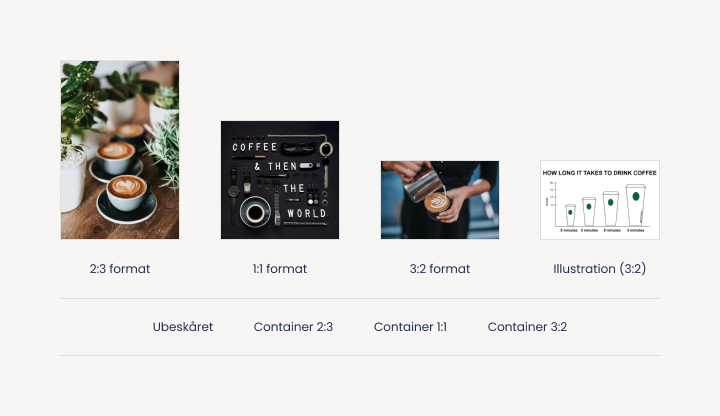
Image cropping
Cropping images can remove unnecessary content and reduce file size. Umbraco's Image Cropper is a feature built into the Umbraco CMS platform for managing images and their cropping. It allows you to control image cropping, optimise image size and create a better user experience by ensuring images are displayed correctly and efficiently on your website.
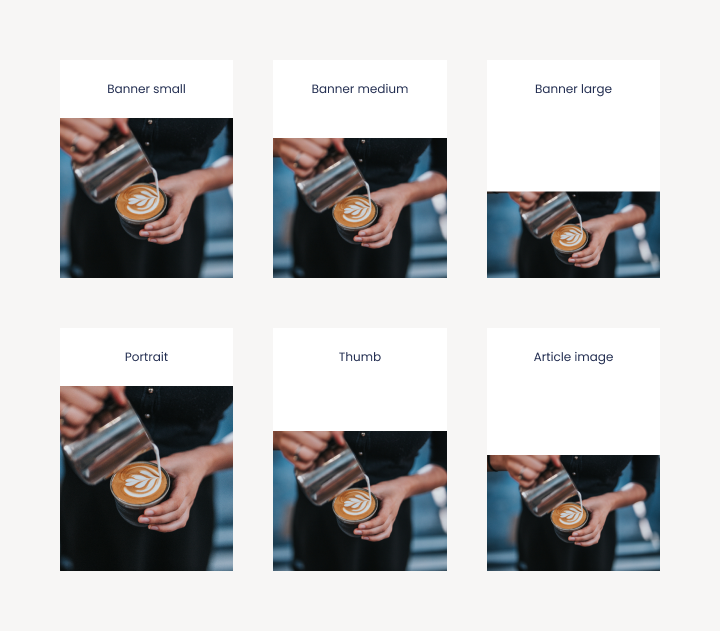
The benefits of using Umbraco's Image Cropper include:
- Flexibility: You can customise multiple cropping templates based on different needs and uses.
- Efficiency: Image Cropper automates the cropping of images so you don't have to create and manage multiple versions of the same image manually.
- Optimisation: By using cropping, you can generate thumbnail versions or custom sizes of images, resulting in smaller file size and faster loading times.
- Responsive design: Image Cropper allows you to customise image cropping for different devices and screen sizes, which is essential for achieving a responsive web design.
- Consistent image handling: By using Image Cropper, you ensure a consistent image display across your website or application.
Compression of images
Image compression is the process of reducing the file size of an image by applying various techniques that eliminate or reduce unnecessary image information without significantly affecting image quality.
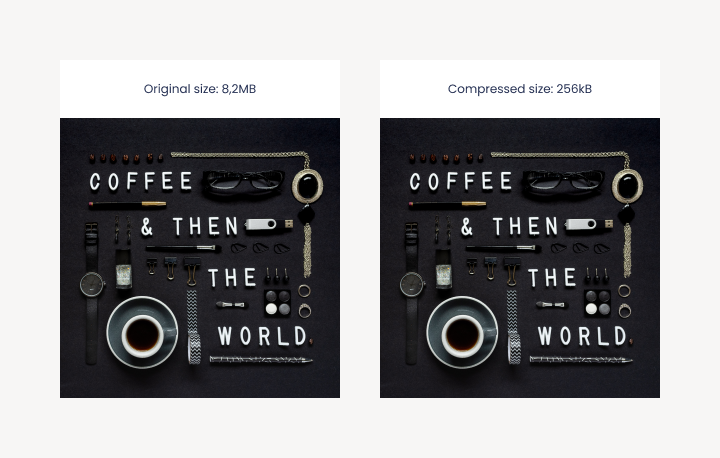
Image compression has several benefits:
- Smaller file size: Compression reduces file size, saving space on storage devices and making it easier and faster to transfer and download images over the internet.
- Faster loading times: Smaller file size means the image can load faster on web pages or applications, improving user experience.
- Reduced bandwidth consumption: Compressing images reduces bandwidth consumption, which is especially important for mobile data services or locations with limited bandwidth.
- Optimised storage space: Compression saves storage space on servers, which is crucial when there is a need to store large amounts of image files.
Focus point
The focal point is a marked point in the image that indicates the most important area to preserve during the cropping process. When an image is cropped, the system tries to preserve the focal point in the cropped image.
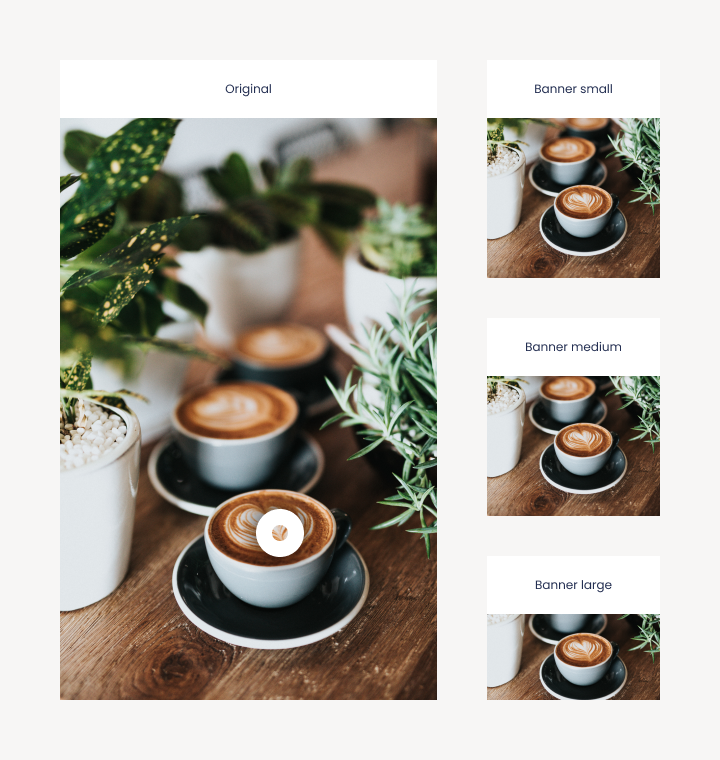
This is useful when you have images where it is important to ensure that a certain area or subject remains visible or centred, even after cropping. The focus point is centred by default but can be adjusted and moved around the image to suit the desired result. This provides more flexible and precise control over the cropping process and ensures that the essential content of the image remains visible and in focus.
Adaptation of images
Image alignment is about how an image adapts and fills an element when the aspect ratio of the original image is not the same as the aspect ratio of the element, such as an original portrait image that needs to be displayed in a widescreen element.
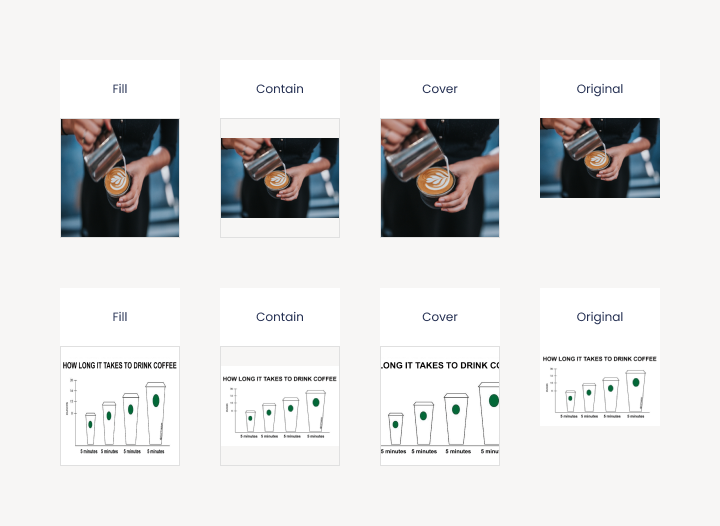
There are several ways to customise images for an element
- Fill: The image will be stretched to fill the content area of the element, regardless of the aspect ratio of the image. This can result in the image being distorted if the aspect ratio of the element differs from the aspect ratio of the image and is therefore rarely used.
- Contain: The image will scale proportionally to fit within the element's content area and the entire image will be visible. There may be empty areas in the element if the aspect ratio of the element differs from the aspect ratio of the image.
- Cover: The image scales proportionally to cover the entire content area of the element and some parts of the image can be cropped to maintain the aspect ratio of the element. This ensures that the element is filled, but some parts of the image may be outside the viewport.
In addition, there are also scenarios where you want to maintain the original aspect ratio of the image without customising the image to an element. For example, this could be when inserting graphs, tables and other motifs of a more technical nature where the entire motif must be visible.
Image formats
Using images in different formats such as wide, portrait and square can have different visual and functional effects depending on the context and purpose.
Here is a description of the use of each format type:
- Wide format: Wide format images have a wider horizontal extent compared to the height. They are often used in landscape photography, web design and presentations where it is desirable to show a wide view or capture a wide perspective.
- Portrait: Portrait images have a greater height to width ratio and are suitable for emphasising vertical elements and objects. They are often used in portrait, fashion and product photography where it's important to focus on a person's face, an object or a vertical composition.
- Square: Square images have the same height and width and create a symmetrical composition. They are popular in social media such as Instagram, where they can be customised and displayed in a miniature square version
The choice of image format depends on the desired visual effect, the message to be conveyed and the platform or context where the image will be presented. It can also be part of the overall aesthetic or branding strategy. Whatever the format, it's important to consider how best to adapt the image and optimise its visual impact in the given application.

If you want to know more about image handling, contact
Digital Designer
Jimmi Nielsen
Want to know more?
Here you'll find inspiration and knowledge about everything related to your digital presence.

Schema Markup
Schema Markup - the beginner's guide to structured data
Find out what Schema Markup is, how it increases your digital visibility and how to implement it on your website.

Standard system or custom-built solution
Standard system or custom build - what should you choose?
Get the answers to the 5 most frequently asked questions we get about standard systems vs custom-built solutions.

Cybersecurity
Cyber security is also relevant for private businesses
Last year, 14% of large Danish companies were hit by cyber attacks. What types of attacks should you be aware of and how can you prevent them?

Umbraco upgrades
Your house needs maintenance - so does your CMS
By maintaining your CMS continuously, you avoid spending significant time and money on repairs or replacements - and you reduce the risk of security issues.

Introduction to web accessibility
Introduction to web accessibility
When your website is accessible, all visitors have a good experience, which benefits both them and your business.

Web accessibility - the 18 best editor tips
Guide with our top 18 editor tips
Learn how to succeed as a web editor when working with web accessibility.

Google SERP
Optimise your visibility in Google SERP
Learn what's in the SERP and what you can do to optimise your visibility in the search results.

Piwik Pro
Alternative to Google Analytics
Can you use Google Analytics or not? And what is the alternative? Here's our take.

Keyword strategy
How to find the right keywords
Keyword optimisation is about understanding users and identifying search intent.

SEO and headings
SEO and headings
What are headings and how do you use them correctly so that search engines understand your texts?

SEO tips
Search engine optimisation tips
SEO is a business-critical discipline that you should allocate resources to.

Knowledge-based sites
Digital dissemination of research and knowledge
In this article, we discuss what you, as a project manager, should be aware of when building a research- and knowledge-based website.

Cookie consent
How to give cookie consent
Erhvervsstyrelsens’ guide clarifies what options users should have to refuse cookies.

What are Progressive Web Apps?
What are Progressive Web Apps?
A Progressive Web App combines the best aspects of mobile-friendly websites and native apps.

Page Speed
Page speed - an important ranking factor
Understand what page speed is and what to consider when planning your page speed strategy.

Open Graph Tags
Use Open Graph tags when sharing on social media
Open Graph Tags allow you to define the information shown when someone shares a link to your page.

Keywords in web texts
How to use keywords in your web texts
Drive more qualified traffic to your website with the correct use of keywords in your web texts.

Language versioning
Get a clear strategy for your language versioning
A multilingual website helps improve conversions and signals that you operate globally.

img alt texts
Guide to img alt texts
Here are our top editor tips for working with img alt texts and web accessibility.

404-page
Optimise your 404 page and help your visitors move on
With a few simple steps, you can turn your website's 404 page into a powerful brand ambassador.

Bounce rate
What is a bounce rate?
What is a GOOD bounce rate? Where is it found in Google Analytics? And how can you improve it?

Core Web Vitals
What you need to know about Core Web Vitals
Understand Core Web Vitals and read about the tools you can use to find the Core Web Vitals score of your website.

Pop ups
Why pop-ups work!
Used in the right way, pop-ups can be a useful tool that supports your growth strategy.

Google link attributes
Link attributes "Sponsored" and "UCG"
Get insights into how to use Google’s link attributes, as well as tips on what to do with backlinks that harm your rankings.